
BentoMoney 1.1.1: One-time income, steadier widgets, and a smoother start
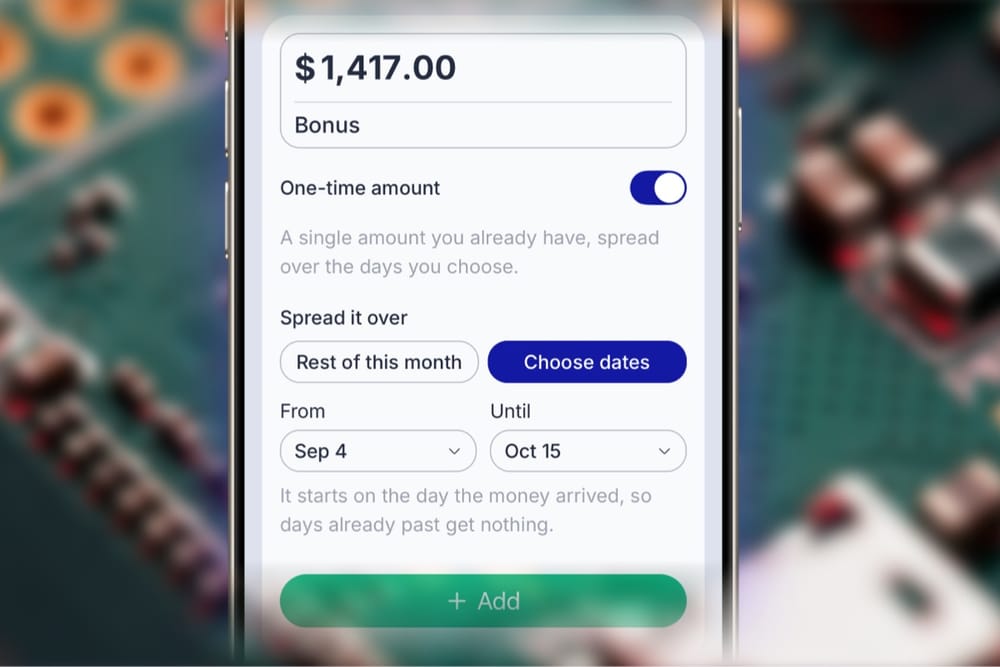
BentoMoney 1.1.1 is mostly about making the app behave a little more like real money does.
The biggest change is how BentoMoney handles income that doesn't fit neatly inside a calendar month. I've also improved how the widget keeps up while the app is closed, changed the initial setup so you can build your budget before reaching the paywall, and made a few smaller stability fixes along the way.
One-time income can now follow your actual dates
Not all income arrives on the first of the month.
Maybe you get paid for a freelance job on September 12 and need that money to last until October 5. Maybe you receive a one-time payment that needs to cover a few weeks rather than one clean calendar month.
You can now tell BentoMoney exactly which dates that money should cover.
Add the amount, choose the start and end dates, and BentoMoney spreads it across that period, even when it crosses into another month.
I don't want BentoMoney deciding that money suddenly stops being useful because September turned into October.
The dates that matter are the dates the money actually needs to last.
The widget now keeps up while BentoMoney is closed
Say you check BentoMoney on Friday, don't open it all weekend, and look at the widget again Monday morning.
The number should already be Monday's number.
Before 1.1.1, the widget could sometimes hold onto an older balance while BentoMoney was closed. You might need to open the app before the widget caught up.
That's now fixed. The widget can keep its displayed balance moving forward in the background without requiring you to open BentoMoney first.
When Monday arrives, the widget should already know it's Monday.
You can set up your budget before the paywall
I've also changed the first few minutes with BentoMoney.
Previously, the subscription screen appeared before the budget setup. That felt backwards. I was asking you to decide whether BentoMoney was worth paying for before you'd even had a chance to put your own numbers into it.
Now the flow is:
- A short introduction
- Terms and privacy
- Your basic budget setup
- The subscription screen
The budget setup is still optional. You can skip it if you just want to get through onboarding.
But if you want to enter your income, bills, subscriptions, and savings first, you can. You'll reach the subscription screen with an actual BentoMoney budget already taking shape.
Built for money that doesn't fit the template
There are a few smaller fixes in 1.1.1 too, mostly around keeping balances and the app's state dependable as time passes.
And as always, feel free to reach out if you have any suggestions or issues with the app. I read all messages and personally respond to them.
👋 Radu,
BentoMoney