
Best budget apps that don’t connect to your bank in 2026
There is a particular kind of optimism that appears when you check your bank balance before buying something.
$1,842.
Looks fine.
Except rent is due next week. The electric bill has not cleared. There is a credit card payment quietly waiting in the background. And you promised yourself that some of that money would finally make it into savings.
Your bank account is not lying to you. It is simply answering the wrong question.
It tells you what you have. It does not tell you what you can safely spend today.
If that is the question you are trying to answer, I wrote a separate guide on how to calculate what you can spend today without treating your bank balance like a budget.
That is one reason people look for a budget app that does not connect to their bank. Some want more privacy. Some are tired of broken bank connections and duplicated transactions. Others have discovered that automatic expense tracking shows them where their money went, but does not always help them decide what to do next.
The good news is that you have several options. BentoMoney, Goodbudget, YNAB, EveryDollar, and even Google Sheets can all be used without linking your bank account. They approach budgeting very differently, though, so the best choice depends on what you want the app to do.
Quick comparison: the best budgeting apps without bank connections
| Option | Bank connection required? | Best for | Main tradeoff |
|---|---|---|---|
| BentoMoney | No | Seeing what you can safely spend today | iPhone only and requires manual entries |
| Goodbudget | No, bank sync is optional | Digital envelope budgeting | More setup and category management |
| YNAB | No, unlinked accounts are supported | Detailed zero-based budgeting | Powerful, but requires learning its system |
| EveryDollar | No, manual tracking is available | Monthly zero-based budgets | Daily spending guidance is limited |
| Google Sheets | No | Complete control over formulas and layout | You must build and maintain the system |
| Pen and paper | Definitely not | The simplest possible budget | Difficult to update and analyze |
None of these is the best budgeting app for every person.
That would be convenient, but personal finance rarely behaves that nicely.
The real question is what kind of answer you want from your budgeting tool.
Do you want to assign money to envelopes? Plan every dollar? Build your own spreadsheet? Or open an app and immediately see what is safe to spend?
Can you use a budget app without linking your bank account?
Yes. A budgeting app does not need bank access to calculate a budget or track expenses.
At its simplest, a budget only needs a few pieces of information:
- How much money is coming in
- Which bills and fixed expenses need to be covered
- How much you want to set aside
- What you spend during the month
You can enter those numbers yourself. The app can then do the math without connecting to your bank account or importing your transaction history.
The difference is who records each purchase.
With bank sync, an aggregator such as Plaid requests transaction data from your financial institution and passes permitted information to the app. Without bank sync, you manually enter the purchase or import a file yourself.
Automatic tracking saves time. Manual expense tracking creates a small moment of awareness.
Neither approach is automatically better. They simply optimize for different things.
Which budget app without a bank connection is best?
The best option depends less on the length of its feature list and more on the question you are trying to answer.
BentoMoney: best for knowing what you can safely spend today
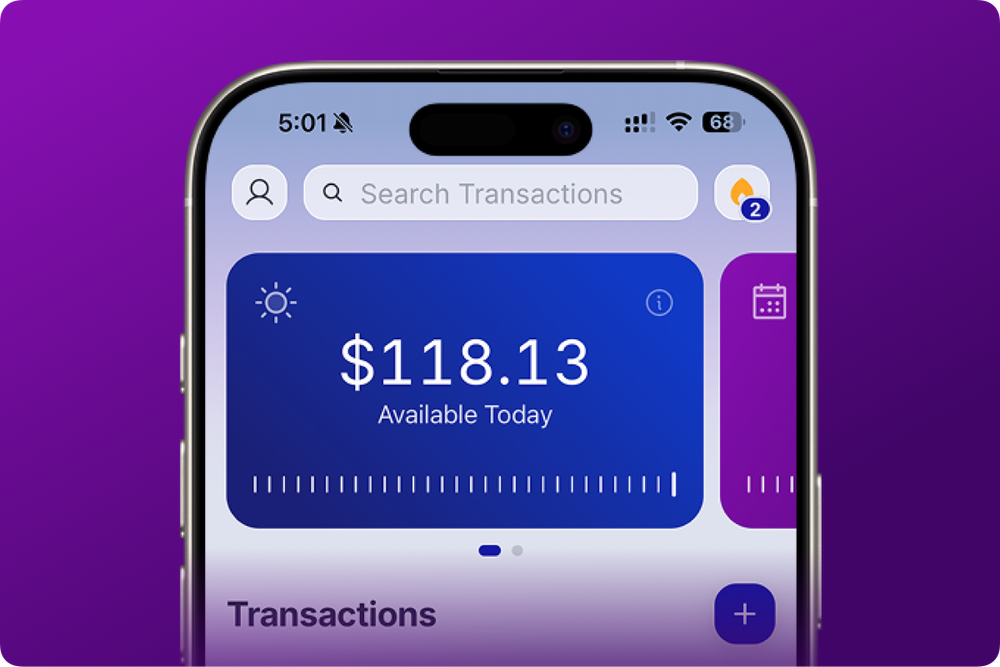
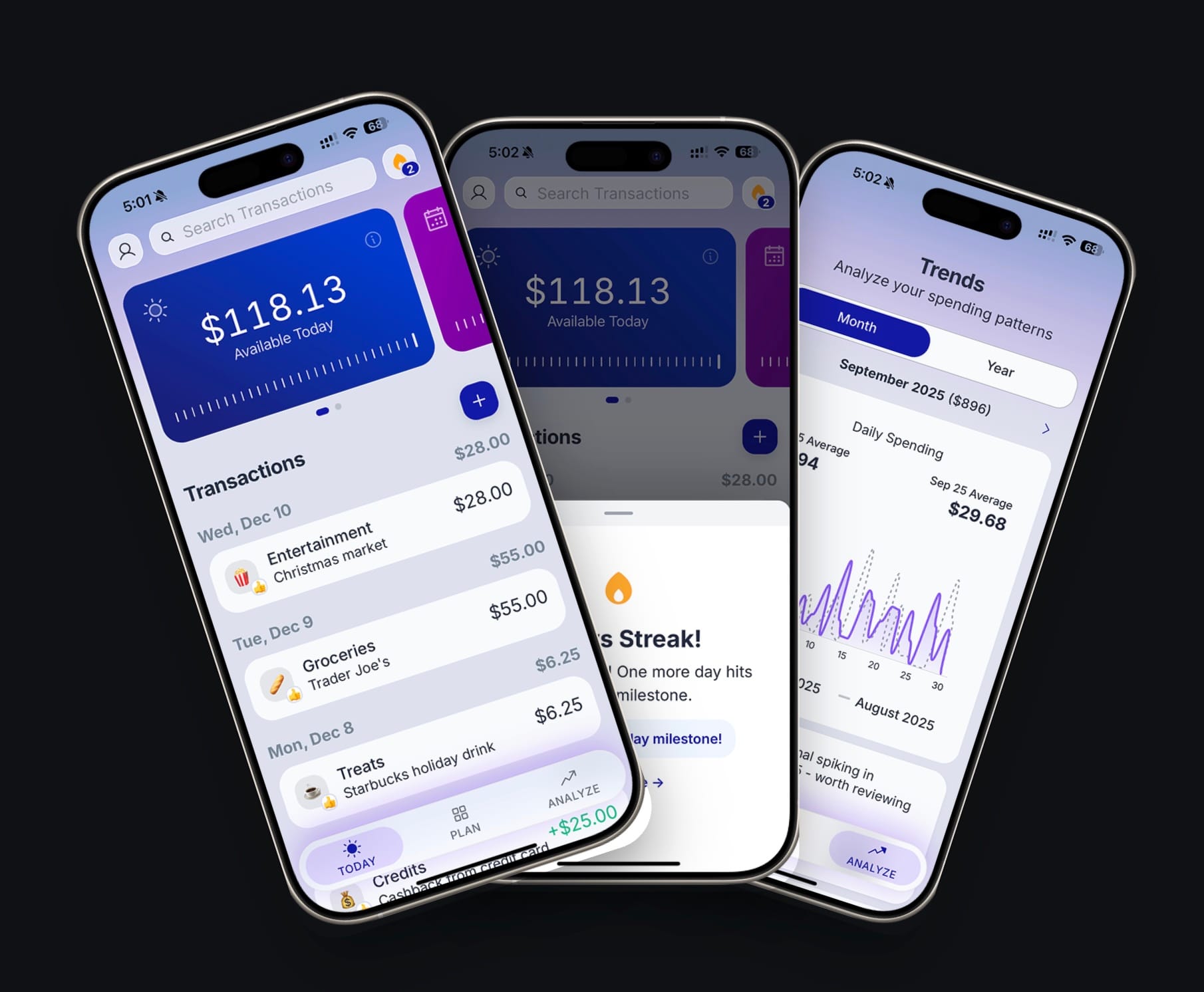
BentoMoney is an iPhone spending tracker with a daily budget calculator.
You add your income, bills, subscriptions, one-time expenses, and savings amount. BentoMoney calculates your Available Today number and updates it whenever you log an expense.
The goal is not to create a detailed accounting system.
It is to give you one useful answer before you spend.
That makes BentoMoney a strong fit for someone who currently does mental subtraction at the grocery store or maintains a simple spreadsheet just to work out how much money is actually available.
It does not connect to your bank. It does not require an account. Your data stays on your device.
Goodbudget: best for digital envelope budgeting
Goodbudget takes the cash envelope method and moves it onto your phone and computer.
Instead of putting physical cash into envelopes marked “Groceries,” “Eating Out,” or “Fun Money,” you divide your budget into digital envelopes. As you spend, you record the transaction and subtract it from the relevant envelope.
Bank linking is optional. Goodbudget supports manually recorded transactions, and its free tier includes a limited number of envelopes and accounts. Automatic bank connections are offered separately through its Premium plan.
Goodbudget makes sense when you like envelope budgeting and want to see how much remains in each category. It may feel like more work if you mainly want a single spending number rather than several individual limits.
YNAB: best for people who want a complete budgeting system
YNAB is one of the most established popular budgeting apps, and it can be used without linking bank accounts.
When adding an account, you can choose an unlinked account and enter your own balance and transactions. YNAB also supports manual entry and file-based importing, so connecting your bank is an option rather than a requirement.
YNAB is built around giving every dollar a job. That can be extremely effective for someone who wants complete control over different accounts, categories, future expenses, and financial goals.
It is also a system you need to learn.
Someone searching for a simpler YNAB alternative may not dislike the philosophy. They may simply want fewer decisions every time they open the app.
EveryDollar: best for a traditional monthly budget
EveryDollar uses a zero-based approach in which income is assigned across expenses, savings, and other budget categories.
Its free version allows users to manually enter and track transactions. Connecting a bank and automatically streaming transactions into the budget are Premium features.[4]
EveryDollar can work well when you want a structured monthly plan and prefer entering transactions yourself. It focuses more on assigning income and expenses across the month than on producing one daily safe-to-spend number.
Google Sheets: best when you want to build the system yourself
A spreadsheet gives you almost complete control.
You can create as many categories as you want, use custom formulas, track cash transactions, and design the budget around your exact situation. You also avoid giving a budgeting app access to your accounts.
The problem is that complete control comes with complete responsibility.
You must build the formulas. You must make sure they still work when a new month begins. You must open the spreadsheet, find the correct row, and keep entering transactions.
This was my system for years.
It worked.
It also became a small administrative job I had somehow assigned to myself.
Are there any free budget apps without bank connections?
Yes, although “free” can mean several different things.
Goodbudget offers a free plan with limits on envelopes and accounts. EveryDollar includes manual budgeting and transaction tracking in its free version. Google Sheets can also serve as a free budget tracker when you build or download a template.
YNAB is free to try before becoming a paid subscription. BentoMoney is also free to try for iOS, with annual and lifetime purchase options.
This distinction matters when comparing the best free budget apps:
- Free plan: You can continue using a limited version without paying.
- Free trial: You can test the complete or nearly complete product for a set period.
- Paid app: Continued use requires a subscription or purchase.
- Free spreadsheet: The tool may be free, but you provide the setup and maintenance.
A free budget app is not necessarily the least expensive option in practice.
An app you abandon after three days has not saved you much.
Neither has a beautiful spreadsheet you avoid opening because updating it feels like filing taxes.
Is it safe to link your bank account to a budgeting app?
There is no honest one-word answer to this.
Services such as Plaid are designed to create a secure connection between financial institutions and third-party apps. Plaid states that it does not share your financial institution username and password with the apps you connect. It transfers authorized financial data through its systems and uses security measures including encryption and monitoring.[5]
That is different from emailing your bank login credentials to a random company.
It also does not mean the choice is risk-free.
Linking bank accounts gives another service permission to access some amount of financial information. The exact information and connection method can vary by institution and app. Security can reduce risk, but no company can promise that a breach, service interruption, incorrect import, or changing connection will never happen.
The practical question is not simply:
Is it safe to link your bank?
A better question is:
Does this app need ongoing access to my accounts to provide the value I want?
For someone managing several cards and bank accounts, the convenience may be worth it.
For someone who only wants to log expenses and see what is safe to spend, it may not be necessary.
Is manual expense tracking too much work?
It can be.
That is the honest answer.
If you wait until Sunday evening and try to reconstruct an entire week from receipts, payment apps, Cash App transfers, Zelle payments, and half-remembered lunches, manual tracking becomes miserable.
The easier approach is to log expenses when they happen.
Coffee. $4.75.
Lunch. $13.
Groceries. $62.
Done.
A good spending tracker should make entering transactions quicker than opening your bank app and studying the transaction list later.
Manual entry also gives the purchase a little weight.
Tap-to-pay removes almost every physical signal that money has left your hands. Entering the amount creates a pause. Not a dramatic financial awakening. Just enough friction to notice what happened.
That pause is the point.
Automation is excellent when you need a complete transaction history. Manual tracking is useful when you want to become more conscious of today’s decision.
When is bank sync the better choice?
A budget app without bank connections is not the right answer for everyone.
Bank-linked budgeting tools can be better when:
- You manage many different accounts
- You frequently forget to record purchases
- You need account balances in one place
- You share a complex household budget
- You want transactions categorized automatically
- Reconciliation matters more than daily awareness
An automated tool such as PocketGuard or another bank-linked personal finance app may be more useful in that situation.
You should not avoid bank sync simply because manual entry sounds more virtuous. A budgeting method only works when it fits your actual habits.
If entering every purchase means you stop using the app after a week, automation is probably the better trade.
If automatic imports make you check your finances once a month after the damage is done, manual tracking may serve you better.
Why I built a budget app that does not connect to your bank
I did not begin by trying to build a privacy and security product.
I began with a spreadsheet.
Every month, I entered my income, subtracted my bills, set aside money for savings, and worked out how much remained. Then I divided that amount by the number of days left.
The spreadsheet gave me the answer I wanted. It was using it that became annoying.
Before buying groceries, I would open the file on my phone, wait for it to load, find the right cell, and do more mental math because several purchases had not been added yet.
At that point, the spreadsheet was not helping me make a decision. It was giving me homework in the produce aisle.
I looked for an app that could replace it.
Most of what I found went in one of two directions. Some apps wanted to become a complete financial command center. Others were basic trackers that recorded spending without telling me what the spending meant.
I wanted something narrower.
Add income. Subtract bills and savings. Divide what remains across the month.
Show me what is Available Today.
So I built BentoMoney.
The lack of bank connections came naturally from that goal. BentoMoney does not need access to your accounts because it is not trying to reproduce your bank statement. It is trying to help with the next spending decision.
What is different about BentoMoney?
Most expense tracking is retrospective.
You spend money. The transaction clears. The app imports it. A chart eventually tells you that eating out was expensive again.
Useful information.
Slightly late.
BentoMoney uses the same expense to update what happens next.
Suppose your Available Today amount is $48 and you spend $12 on lunch. After you enter the purchase, the app recalculates your spending guidance. You can see the effect across your daily, weekly, and monthly views.
You are not just tracking where $12 went.
You are seeing what that $12 changed.
That is why BentoMoney does not try to compete with YNAB at detailed financial planning, Goodbudget at envelope budgeting, or a bank-connected dashboard at account aggregation.
It has a smaller job:
Know what you can safely spend today.
No bank connection. No account. Your data stays on your device.
How should you choose?
Choose BentoMoney when you want one clear number, fast manual expense tracking, and no bank connection.
Choose Goodbudget when envelope budgeting makes intuitive sense and you want to divide spending across categories.
Choose YNAB when you want a powerful budgeting method and are willing to learn and maintain the system.
Choose EveryDollar when you prefer a traditional monthly zero-based budget with manual transaction entry.
Choose Google Sheets when customization matters more than convenience.
Choose bank sync when automatic transaction coverage is more important than entering purchases yourself.
There is no prize for choosing the most sophisticated app.
The best budgeting tool is the one that answers the question you actually have.
For me, that question was never:
Where is all my money?
It was:
How much of it can I safely spend today?
Frequently asked questions
Can I track expenses without connecting a bank account?
Yes. BentoMoney, Goodbudget, YNAB, EveryDollar, spreadsheets, and other budgeting tools support some form of manual tracking. You enter each transaction yourself instead of importing it from your bank.
Does YNAB require a bank connection?
No. YNAB supports unlinked accounts, manual entries, and file-based transaction imports. Linking bank accounts is optional.
Does Goodbudget require bank access?
No. Goodbudget can be used with manually recorded transactions. Automatic bank sync is an optional Premium feature.
Which budget app is best for manual entry?
BentoMoney is a good fit when you want quick manual expense tracking and a daily safe-to-spend number. Goodbudget is stronger for manual envelope budgeting, while YNAB is more appropriate for a detailed zero-based plan.
Can I manage my finances without sharing bank credentials?
Yes. You can manually enter income and expenses into an app, use downloaded bank files, maintain a spreadsheet, or use pen and paper. The tradeoff is that you become responsible for keeping the information current.
Is a spreadsheet better than a budgeting app?
A spreadsheet offers more customization. An app is usually faster to update and easier to use on your phone. The better choice depends on whether you value complete control or daily convenience.
What to remember
- A useful budget app does not have to connect to your bank.
- Bank sync is convenient, but manual entry can create stronger spending awareness.
- Goodbudget, YNAB, and EveryDollar all support budgeting without mandatory bank linking.
- Google Sheets provides flexibility, but you must maintain the system yourself.
- BentoMoney is designed for people who want to know what they can safely spend today.
- Privacy is not the only reason to avoid bank connections. Sometimes the app simply does not need them.
- Choose the simplest tool that reliably answers your real financial question.
Your bank tells you what you have.
A budget should tell you what you can spend.
BentoMoney is free to try for iOS.
Radu